Dr. Canary
The bird tries your site on for size.
User experience testing: the bird uses the tools on your site the way a customer does, and records what happened.
The bird finds the tools on your site and uses them the way a customer would. When one does not work, you get the screen a customer would have seen, marked in red, with the page’s URL.
Pick a tool. Watch the bird try it.

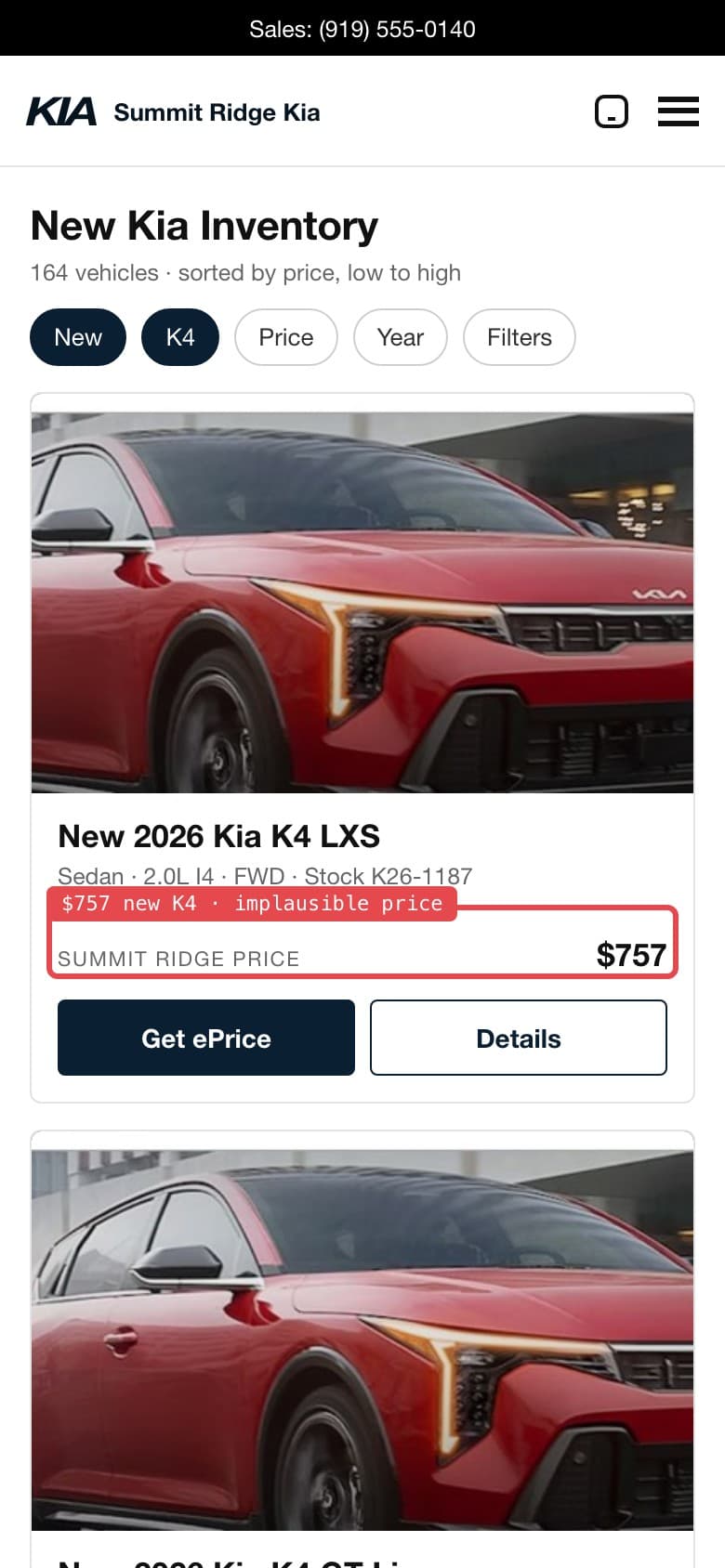
Tool: Inventory search · the bird’s check ledger · example
- inventory loadspass
- narrowed to new K4pass
- a believable priceFAILWhat it found (example): a new K4 listed at $757
What the bird did: Searched the new inventory and narrowed it to the K4.
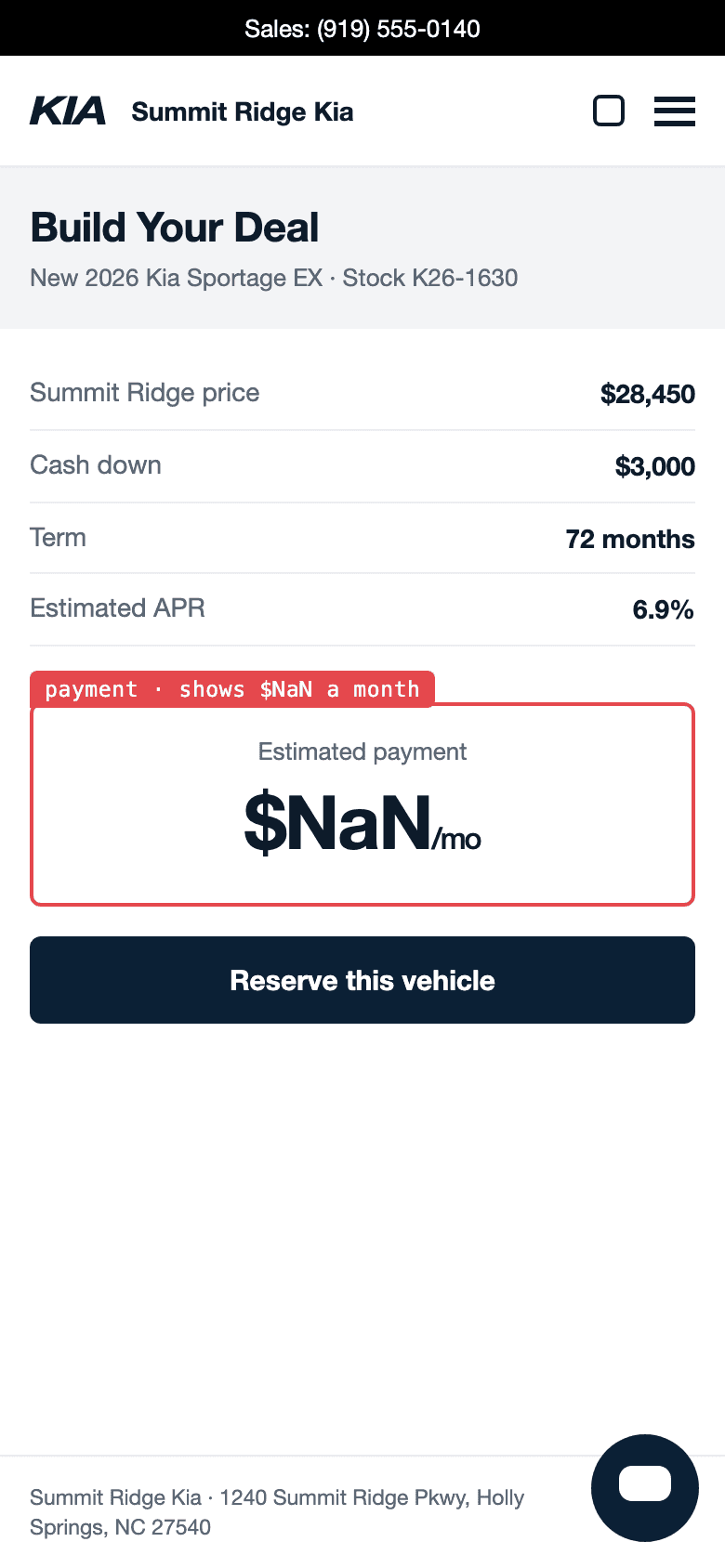
Tool: Payment calculator · the bird’s check ledger · example
- vehicle price carried inpass
- down payment, term, ratepass
- a monthly payment shownFAILWhat it found (example): the payment is not a number
What the bird did: Took a Sportage’s price, entered a down payment, a term and a rate.
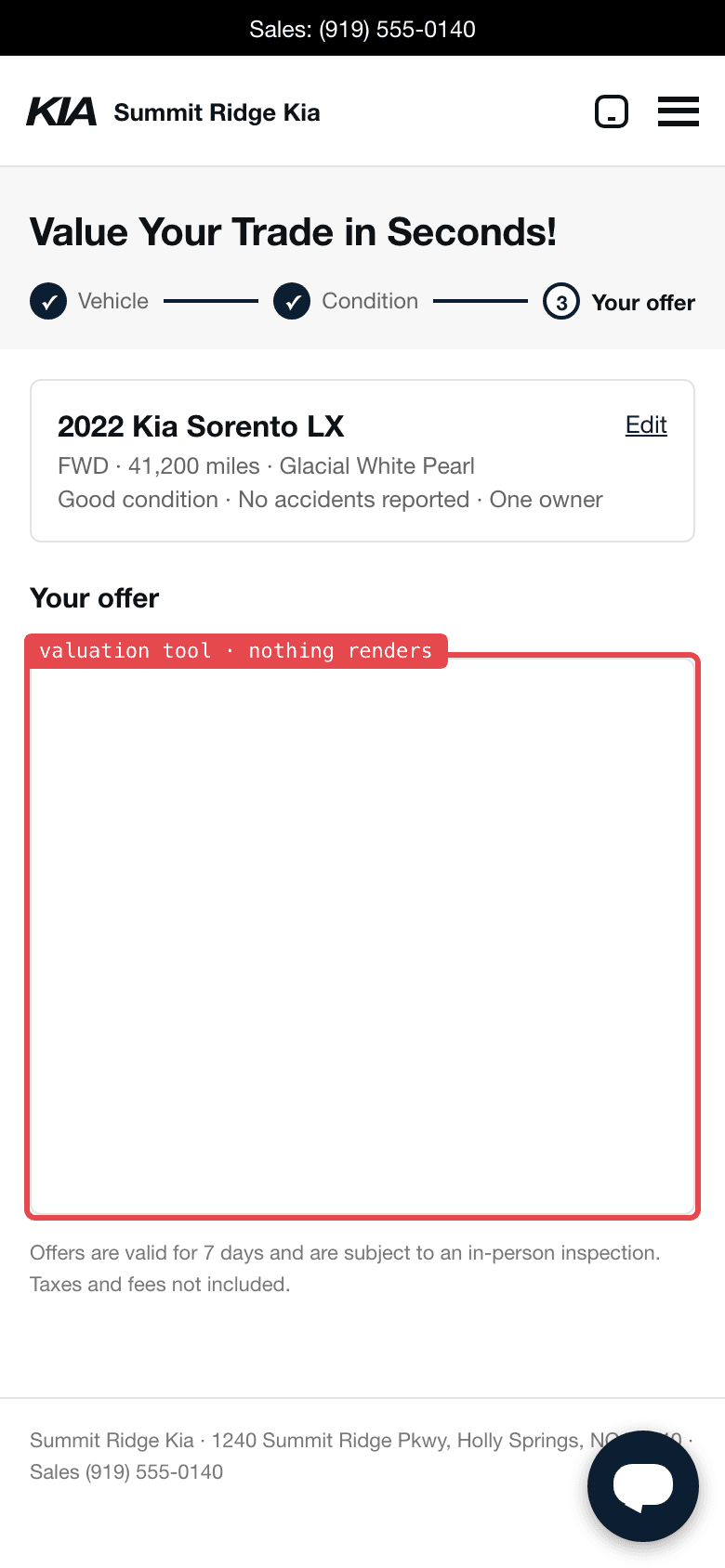
Tool: Trade-in tool · the bird’s check ledger · example
- vehicle enteredpass
- condition enteredpass
- an offer is shownFAILWhat it found (example): no offer shown
What the bird did: Entered a 2022 Sorento, its mileage and its condition.
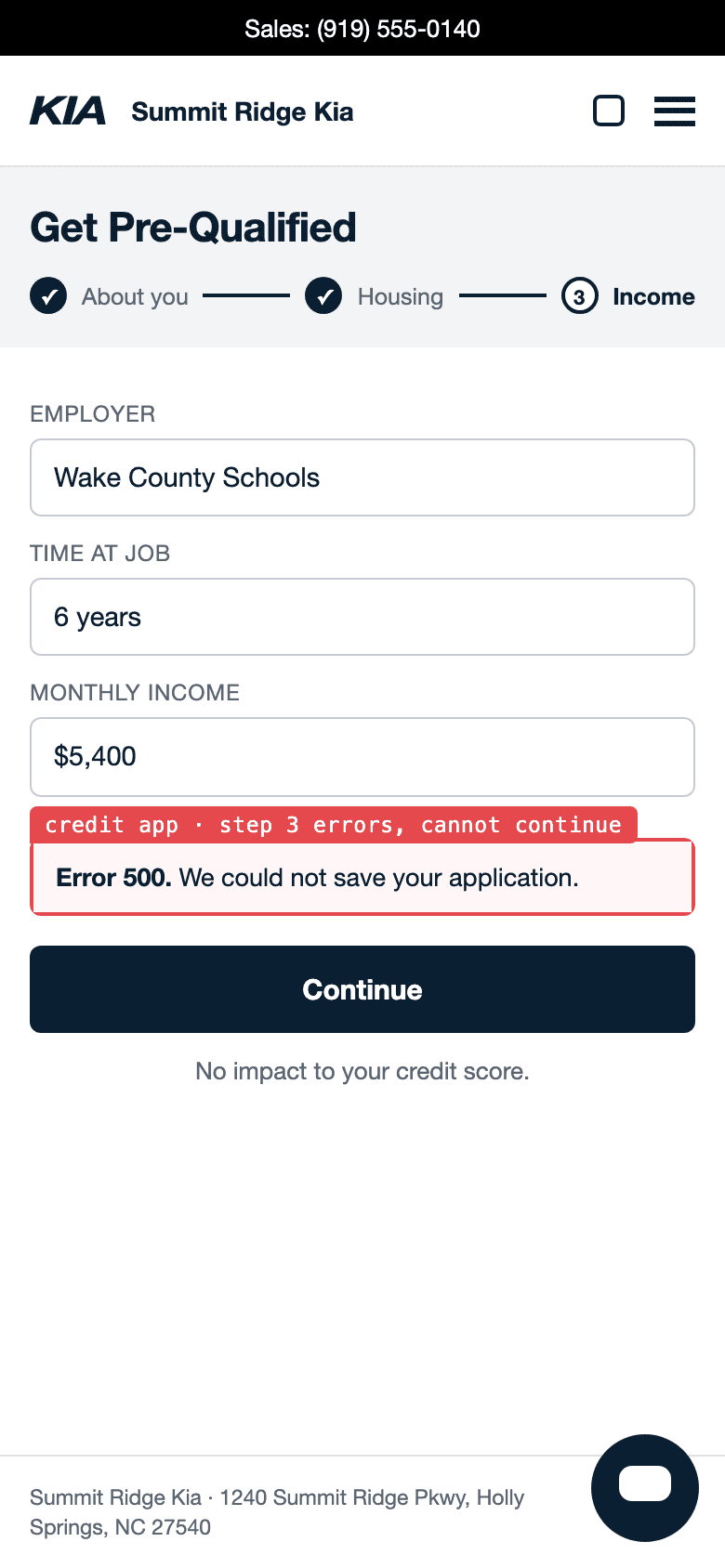
Tool: Credit application · the bird’s check ledger · example
- step one, about youpass
- step two, housingpass
- step three savesFAILWhat it found (example): stops at step three
What the bird did: Worked through the pre-qualification, one step at a time.
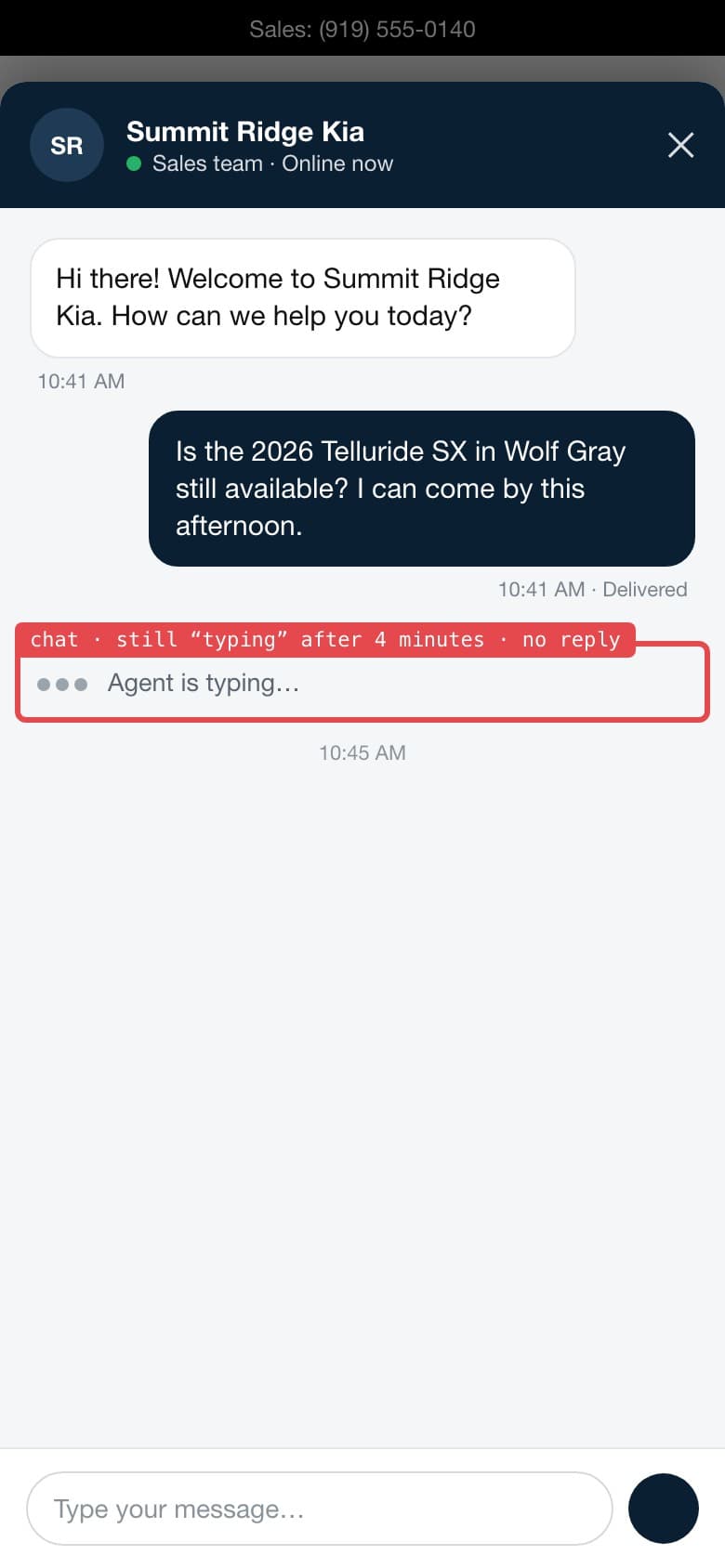
Tool: Chat · the bird’s check ledger · example
- chat openspass
- question sentpass
- a reply arrivesFAILWhat it found (example): no reply after four minutes
What the bird did: Opened the chat and asked whether a Telluride was still available.
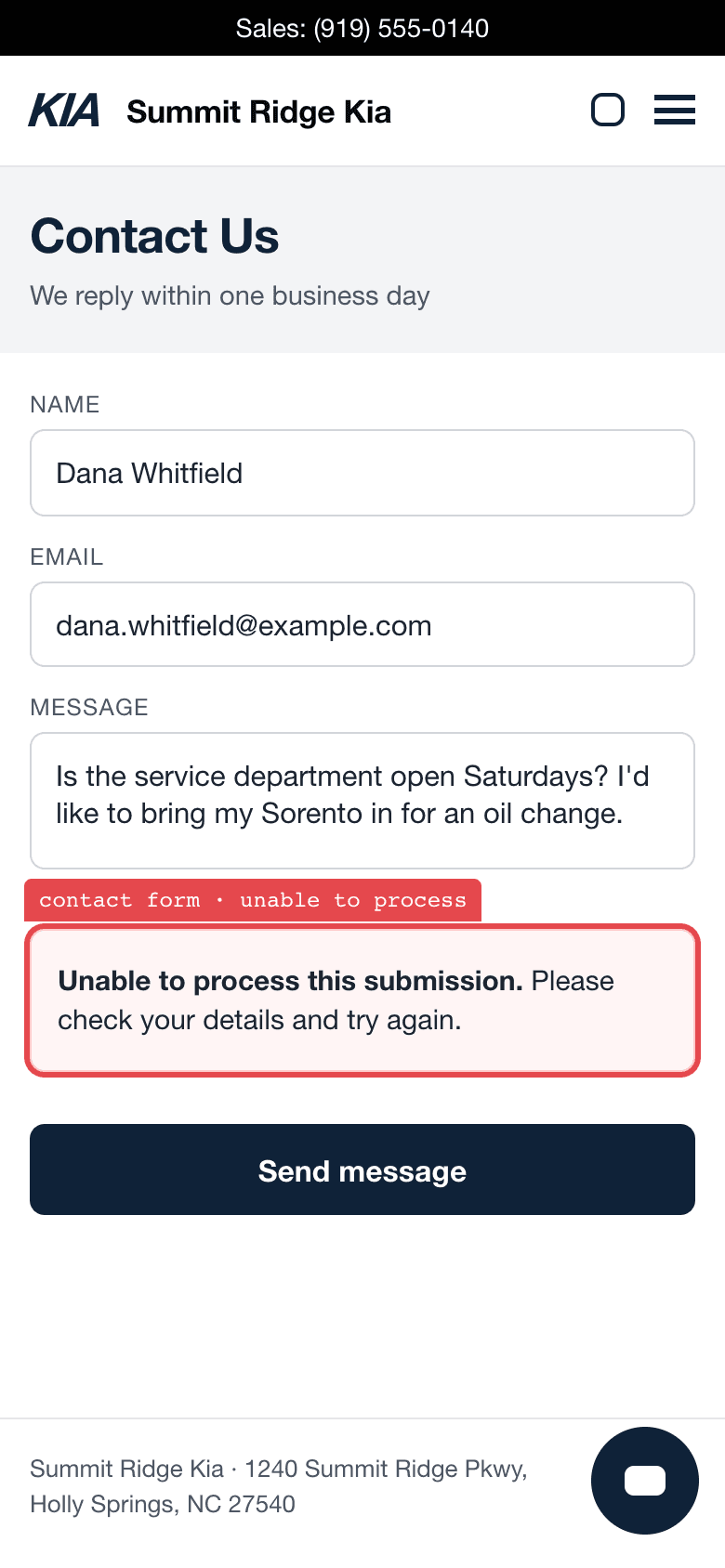
Tool: Contact form · the bird’s check ledger · example
- form loadspass
- question writtenpass
- message acceptedFAILWhat it found (example): the message was refused
What the bird did: Asked a question about Saturday service hours.
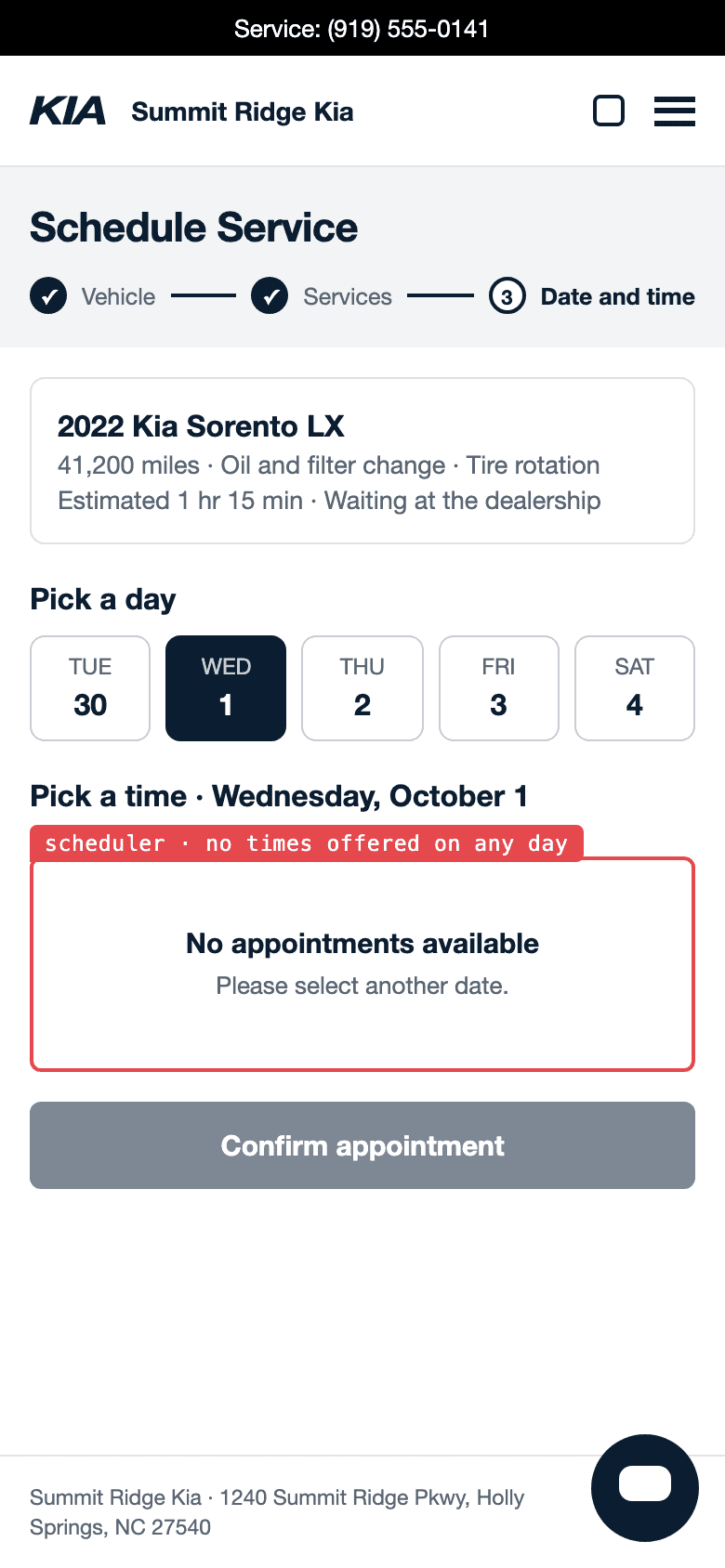
Tool: Service scheduler · the bird’s check ledger · example
- vehicle and service chosenpass
- a day pickedpass
- a time is offeredFAILWhat it found (example): no times offered
What the bird did: Chose a vehicle and a service, then picked a day.
How it goes
It arrives like a customer.
It loads your site in an ordinary browser, with an ordinary browser user-agent.
It finds the tools itself.
It finds the tools on your site and uses them without a script from you.
It uses them.
It searches the inventory, opens vehicle pages, runs the trade and payment tools, fills in the forms and opens the chat. A step counts only when the page that follows shows it worked.
It records what it saw.
It keeps screenshots as it goes. Every finding comes with the screenshot and the URL.
What a finding looks like
The screen a customer would have seen, with a red mark on the part that went wrong and the address of the page it was on.
- The screenas the shopper saw it
- The marka red box and a short label
- The addressthe page’s URL
The inventory lists tools detected on your site. A count there is tools shown, not tools verified as working: a finding is what the bird saw when it used the tool.
The same idea on other kinds of site
 Kind of site: A lender’s siteWhat the bird tries: Pre-qualification, the rate quote, the online application, scheduling a call.Page: For loan officers
 Kind of site: A provider’s siteWhat the bird tries: Find a doctor, online scheduling, the appointment request form, patient portal sign-in.Page: For providers
 Kind of site: SoftwareWhat the bird tries: The sign-up form, the verification email, form errors, the first task.Page: For B2B software
 Kind of site: A consumer appWhat the bird tries: Creating an account, the text message code, setup questions, the free trial.Page: For consumer apps
 Kind of site: A consumer brandWhat the bird tries: The cart, checkout and sign-ups. It stops before it pays.Page: For consumer brands
Point the bird at something particular
On monitoring, a saved shopper can carry areas of focus: what to do, in 12 to 600 characters, an optional start page, an optional line on what counts as done, and whether it runs one time or going forward.
What it does not do
- It is not an uptime monitor. An uptime monitor checks every few minutes and tells you when the whole site is down, and it is worth running too.
- It is not a speed test. A speed test times how fast a page loads, and it is worth running.
- It is not an SEO audit. An SEO audit checks what a search engine reads, and it is worth running.
- It is not an A/B test. An A/B test shows visitors two versions of a page and counts which one they respond to.
- It does not include a showroom visit. It shops online.
- Coverage is adaptive, not a complete crawl. The pages and tools it tries depend on the site, the time available and what it can reach.
- A page that challenges automated visitors is reported as unverified, not as broken.
- Using a tool is not by itself proof that the tool works. The bird needs the page that follows to show it.
- A check is automated and point-in-time. A report is not a security audit or a compliance certification.
Ask your assistant
More examplesWhich tools did the bird find on my site?
list_site_tools
The inventory lists tools detected on your site. A count there is tools shown, not tools verified as working.
Show me the journeys from my latest check and what was assessed on each.
list_journeysget_journey_assessment
An empty list of assessments means none was returned, not a failed test.
Explain the findings in my latest report and show me the captures.
list_reportsget_report
Questions
What is user experience testing?
Using your site the way a customer does and recording what happened. The bird finds the tools on the site, uses them, and keeps the screenshot and the URL of every finding.
Is it a real person?
No. It is automated. It loads your site in an ordinary browser from the addresses listed on our crawler page, and an inquiry it sends names itself as an automated Dr. Canary site test.
Which tools does it try?
On a dealership’s site: the inventory search, vehicle pages, the trade and payment tools, the forms, the chat and service booking. It finds them itself, so you do not hand it a list. Other kinds of site have their own tools, listed above.
Does it work on a phone-sized screen?
The example captures on this page are phone captures of a fictional store. For your own site, your assistant can read the viewports each journey used with list_journeys.
Can I tell it what to try?
Yes, on monitoring. Add an area of focus to a saved shopper: what to do, an optional start page and what counts as done, one time or going forward.
Will it break anything or place an order?
On a public or unclaimed site it stops before anything consequential is sent. On a site you monitor, a shopper set to submit sends inquiries and books appointments as a named test, and one set to look only stops at the last step before anything is sent. On a consumer brand’s site it fills the cart and stops before it pays.
How is it different from a speed test?
A speed test times how fast a page loads. It does not fill in a form or value a trade, so a page can pass it while a tool on it is broken. The bird uses the tool.