 Dr. Canary
Ask your AI
what the bird found.
Dr. Canary connects to ChatGPT, Claude, Codex and Claude Code. Your assistant can read your reports and checks, change a saved shopper, and request a check. It uses your account’s permissions and asks before it writes.
What did the last check find at summitridgekia.com?
list_siteslist_reportsget_report
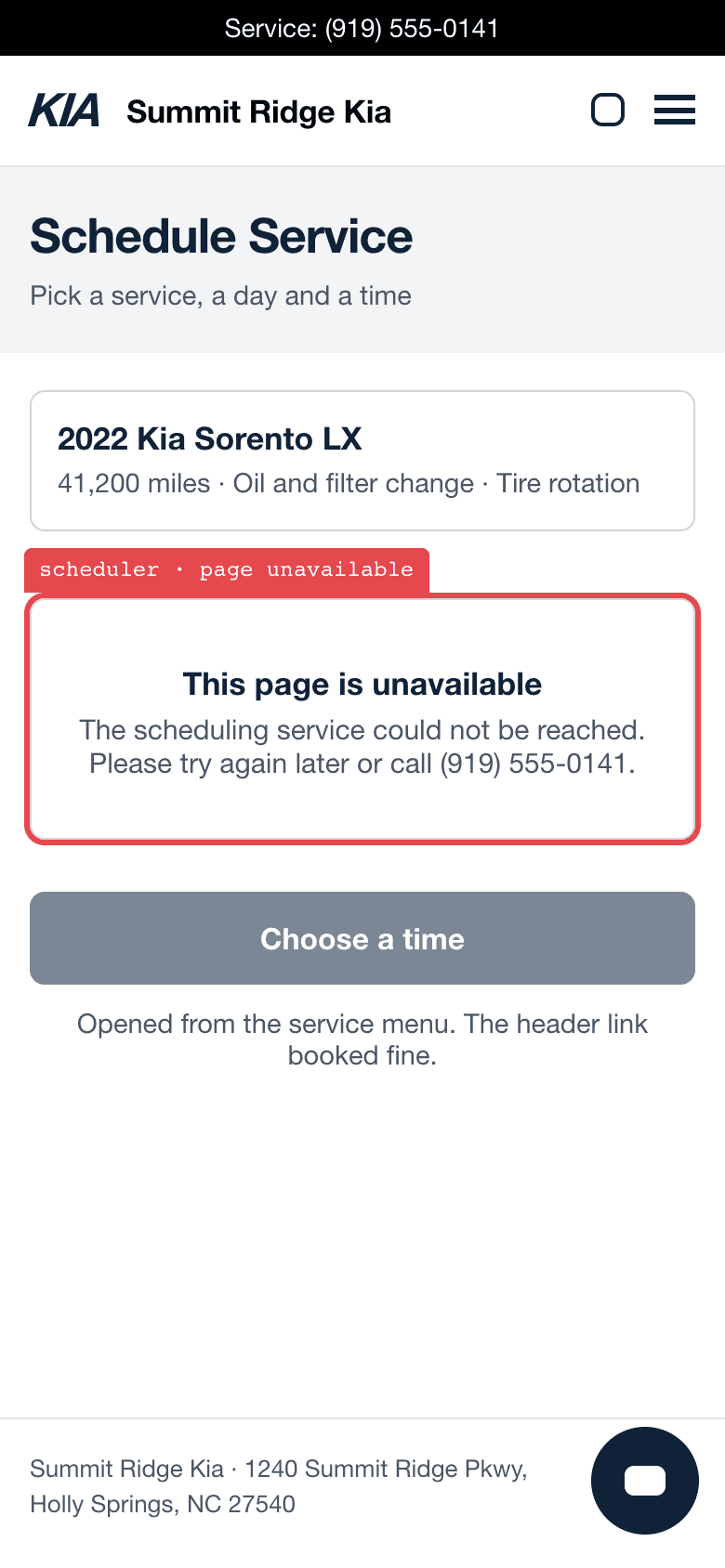
Published October 11, 2026. One finding. The booking link in the site header took a reservation. The second scheduler, linked from the service pages, opened to “This page is unavailable.”

Three jobs, eight tools.
Your assistant gets the portal’s reads and its two writes, through the same service the portal uses.
Read what the bird found
Your sites, the saved shoppers on each, every recorded check, and every published report with its captures, inquiry replies, and findings.
What did the last check find at my store?
list_siteslist_assignmentslist_runsget_runlist_reportsget_report
Change a saved shopper
Create a shopper or edit one: its name, departments, whether it sends test inquiries, how often it runs, and whether it is paused. Saving never starts a check.
Pause the service shopper until next month.
save_assignment
Request a check
Queue the basic site check with the site’s saved shopper. It may send test inquiries and it uses your plan’s allowance, so your assistant asks before it runs.
Recheck the site and tell me when the report is published.
request_recheck
Connect your account
Pick your assistant. Each path ends at the Dr. Canary sign-in, where you see what the connection can read and change before you approve it. Then ask your assistant to list your Dr. Canary sites.
Plugins, on chatgpt.com
- Open Plugins, press +, and choose Add custom MCP server.
- Paste the server URL and choose OAuth for authentication.
https://www.drcanary.com/api/mcp/ - Choose Create as a plugin, install it, then press Connect and sign in to Dr. Canary.
Customize › Connectors, on claude.ai
- Open Customize › Connectors and choose Add custom connector.
- Choose Web, name the connector Dr. Canary, and paste the server URL.
https://www.drcanary.com/api/mcp/ - Select Sign in now and Use Claude’s published identity. Add the connector, then sign in to Dr. Canary and approve the connection.
Settings › MCP servers, or the terminal
- Add the server from the terminal.
codex mcp add dr-canary --url https://www.drcanary.com/api/mcp/ - Finish sign-in in your browser. To open sign-in again, run this command.
codex mcp login dr-canary - In the Codex app, Settings › MCP servers › Add server takes the same URL as Streamable HTTP, then Authenticate.
In your terminal
- Add Dr. Canary as an HTTP server.
claude mcp add --transport http --scope user dr-canary https://www.drcanary.com/api/mcp/ - In Claude Code, run /mcp, select dr-canary, and authenticate. Finish sign-in in the browser on the same device.

Give your assistant something to read.
A checkup is one report. Monitoring keeps the bird shopping your site on a schedule, so there is a fresh report every time you ask.