 Dr. Canary
The bird takes no for an answer.
Then it checks that your site does. A consent comparison you can add to any shopper.
The bird compares what your site requests and stores at five moments: on arrival, after Reject all, after Accept all, after the choice is withdrawn, and on a return visit. You add it to a saved shopper as an area of focus, in the app or by asking your assistant.
Example · Ashgrove Point Health
Care close to home
What loaded before a choice
- analytics request · before the banner
Arrivebefore any choice
- banner shown on arrivalpass
- analytics requeststarted before the banner
- ad requestnone before a choice
Result recorded, nothing chosen yet

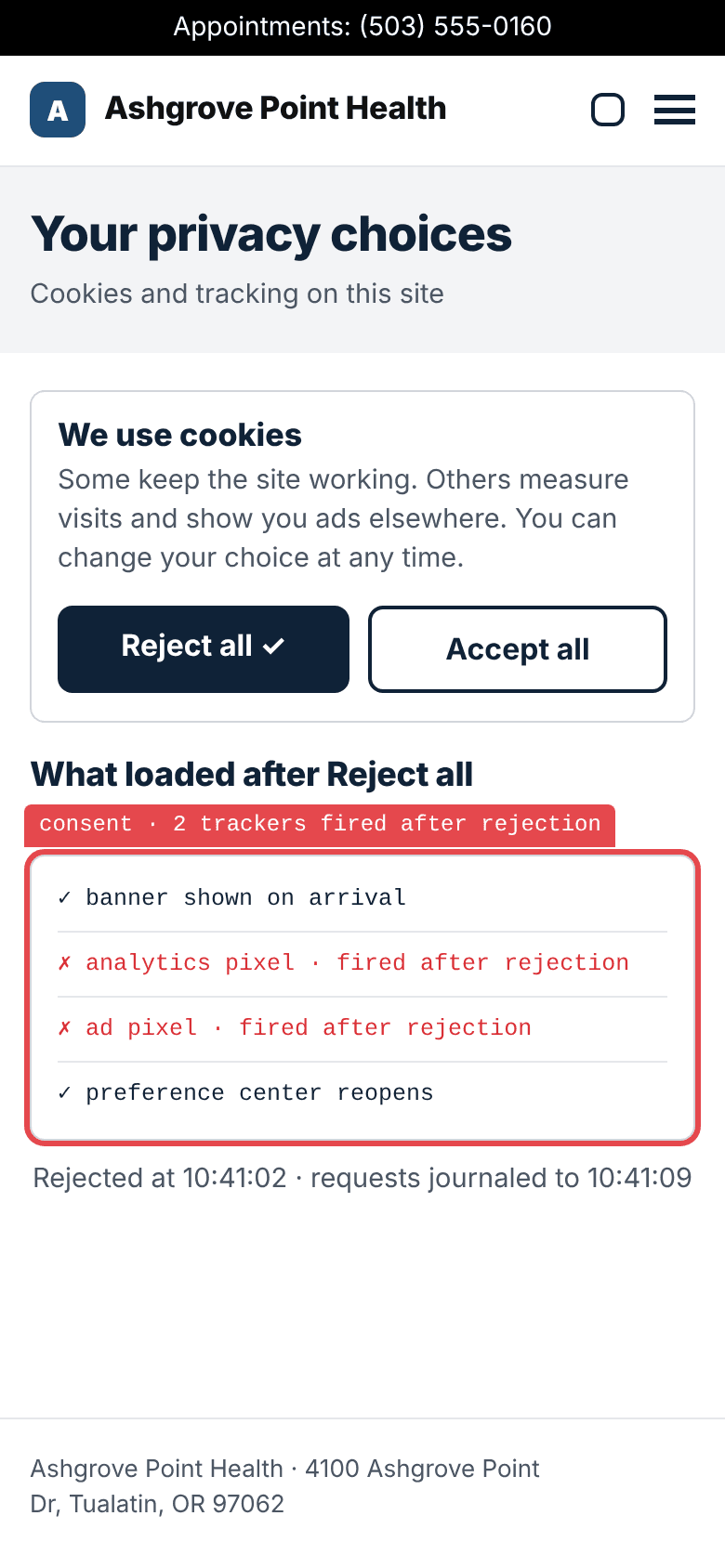
RejectReject all
- Reject all · chosenpass
- analytics requestFAILstarted after Reject all
- ad requestFAILstarted after Reject all
Result rejected, and still tracked
Find a doctor · page 2 of 2
Family medicine
Accept all ✓What loaded while accepted
- analytics request · started
- ad request · started
- analytics cookie · present
AcceptAccept all, two pages
- Accept all · chosenpass
- pages browsed while accepted2
- analytics and ad requestsstarted
- analytics cookiepresent
Result accepted, requests recorded
Your privacy choices
Save choices ✓What loaded after withdrawing
- straight away · nothing new
- next page · nothing new
- reload · nothing new
Withdrawsame browser
- preferences reopenpass
- Reject all · chosen againpass
- straight awaypassno new tracking requests
- next pagepassno new tracking requests
- reloadpassno new tracking requests
Result withdrawn, and it held

The next visit · same browser
Care close to home
What loaded on return
consent · 1 request on return- ad request · started on return
- analytics cookie · still present
Returnthe next visit
- return visit, same browserno banner
- ad requestFAILstarted on return
- analytics cookiestill present
Result the earlier acceptance came back
Withdrawn, and tracked again on return.
How it goes
Arrive
The bird arrives before any choice is made and records the banner as it appears and what the page is already requesting. It keeps apart what started before the banner showed and what started while it waited for a choice.
Reject
It finds the site’s own controls, in the banner, a privacy link or a preference center, and rejects every optional purpose. Then it keeps browsing and checks what still fires.
Accept
It finds the way back to the choices, accepts every optional purpose, and browses two different pages while accepted.
Withdraw
In the same browser, it reopens the choices and rejects everything again. It checks what fires straight away, on the next page and on a reload.
Return
It comes back in that same browser and reports whether the choice stuck: the rejection held, or the earlier acceptance came back.
What counts, and what does not
- Closing the banner is a dismissal, not a choice, unless what the bird observed shows the site treated it as one.
- A choice that covers only some purposes is recorded as partial, not as rejecting everything.
- If there is no way to reopen the choices, the bird reports that the control is missing. It does not guess what a missing control would have done.
- Still fires means a request that began after the choice. The bird compares when each request started with the moment of the choice.
- Cookie snapshots show that a cookie is present or has changed. They do not show the exact moment it was written.
- A purpose such as analytics or advertising is named only where what the bird observed supports it.
- What it could not establish stays unresolved, with the reason.
What you get
What the bird finds arrives in the report as findings, each with its evidence. Below is an example on a fictional clinic.
| Stage | Choice | Analytics request | Ad request |
|---|---|---|---|
| Arrive | none yet | started before the banner | none |
| Reject | Reject all | started after the choice | started after the choice |
| Accept | Accept all | started | started |
| Withdraw | Reject all, same browser | none | none |
| Return | none, same browser | none | started on return |
Withdrawn, and tracked again on return.
Every screen and row on this page is an example on a fictional clinic, Ashgrove Point Health. No public report shows a consent comparison yet.
Add it to a shopper
Open a saved shopper, choose Add an area of focus, and describe the comparison. Or ask your assistant to add it for you.
Example · Area of focus 1
https://www.ashgrovepoint.example/- What to do takes 12 to 600 characters. What counts as done (optional) takes up to 300. A start page is a full web address.
- Runs one time: on the next check only. Runs going forward: on every check.
Or say it to your assistant
Add an area of focus to my shopper, going forward: compare what the site requests and stores before a cookie choice, after Reject all, after Accept all, after withdrawing in the same browser, and on a return visit. Keep every other setting as it is.Your assistant reads the shopper with list_assignments, then saves it with save_assignment and focus, keeping every other setting as it was. Saving does not start a check.
Adding it means changing a saved shopper, which needs monitoring and an owner or admin of the site. A one-time checkup does not include changing a saved shopper.
Where it helps
| Site | An area of focus to ask for |
|---|---|
| A clinic | Reject all on the home page, then check what still fires while finding a doctor. |
| A lender | Compare what a rate quote page requests before a choice, after Reject all and after Accept all. |
| A store | Withdraw the choice after browsing products, then check that it holds on the next visit. |
What it does not do
- It is not legal advice or other professional advice, and a report is not a legal or regulatory compliance certification.
- It does not decide which law applies to you.
- It records what it observed at the time it looked. Sites change, and a report is not a promise about later behavior.
- What it could not establish stays unresolved, with the reason. It is not turned into a pass or a fault.
- An absent finding is not proof that your consent choices work.
- On a public site it does not accept terms, create accounts or enter personal data.
Ask your assistant
More examplesShow my saved shoppers and their areas of focus.
list_assignments
Add a consent comparison to my shopper as an area of focus, going forward. Keep every other setting.
list_assignmentssave_assignment
Your assistant reads the shopper first and saves it with the new focus. Saving does not start a check.
Run a check on my site now.
request_recheck
It runs the first saved shopper that has not been retired, which may not be the one you just changed. It needs monitoring, may send test inquiries and use your allowance.
What did the latest report find about cookies and consent?
list_reportsget_report
Questions
What is consent testing?
A comparison of what your site requests and stores at five moments: on arrival, after Reject all, after Accept all, after the choice is withdrawn, and on a return visit. The bird uses your site’s own banner and preference controls, the way a visitor would.
Does it tell me if I am compliant?
No. A report records what the bird observed at the time it looked. It is not legal advice or a legal or regulatory compliance certification, and it does not decide which law applies to you.
Which sites can it run on?
Any site you monitor with Dr. Canary. It is added to a saved shopper as an area of focus, and saved shoppers come with monitoring.
How do I turn it on?
Add an area of focus to a saved shopper that asks for the comparison, in the app or by asking your assistant. Choose one time to run it on the next check, or going forward to run it on every check.
Does it accept cookies on my site?
Yes, as one of the five stages. It accepts every optional purpose your banner offers, browses two pages, then withdraws the choice in the same browser and checks whether the rejection holds. It does not accept terms, create accounts or enter personal data on a public site.
What counts as “still fires”?
A request that began after the choice was made. The bird compares when each request started with the moment of the choice, and names a purpose such as analytics or advertising only where what it observed supports it.
What if my banner has no way to reopen the choices?
The bird reports that the control is missing and tries another route the site offers, such as a privacy link. It does not guess what a missing control would have done.
How often does it run?
On the shopper’s schedule. A one-time area of focus runs on the next check only. One that runs going forward is part of every check that shopper makes.
Saved shoppers come with monitoring.
Add the consent comparison to one in the app, or ask your assistant to.